
Last week, I wrote about the official node_exporter for AIX — the little agent that sits on your server and tells Prometheus what's going on. Reasonable question that followed: Okay, but where do I run the Prometheus part?
Not on AIX, apparently. Not officially, anyway.
So this week I ported it.
The JavaScript Ecosystem, On a Dare
I expected the Go side to be the tricky bit. AIX ppc64 is big-endian, unusual for Linux developers, and the kind of platform where syscall packages are held together by build tags and prayer. Instead, the fight started in the web UI.
Prometheus 3.x ships a modern React UI built with Vite, which uses Rollup, which — as of version 4 — rewrote its parser in Rust and distributes it as native binaries per platform. Their supported list includes Linux on ppc64le. It does not include AIX on ppc64. These are the same CPUs. Different operating system, and suddenly we're off the map.
The official workaround is a WebAssembly build of the parser. I tried it. The WASM parser encodes AST node types as little-endian integers in a shared buffer, and on a big-endian system, those get byte-swapped on read. The first error said Unknown node type: 1207959552. That's 0x48000000, which is 72 with three zero bytes padded on the wrong side. 72 is a perfectly reasonable node type if you read the bytes the other way around. I tried an older version of Rollup. It threw a different endianness bug — memory access out of bounds — but the root cause was the same.
This is where I accepted that modern JavaScript was not going to be built on AIX this week.
The Actual Plan
The thing is, Prometheus's UI is a build-time artifact. The runtime never touches Node. The JavaScript toolchain only exists long enough to produce a folder full of HTML, CSS, and JS, which the Go compiler then embeds into the binary.
So I built the UI on my Mac. Shipped the folder to AIX. Compiled the Go binary there with the assets already baked in. The binary is self-contained — no Node, no Rollup, no WASM, nothing from that world is on the production machine.
This is also, it turns out, what Prometheus's own PREBUILT_ASSETS_STATIC_DIR mechanism exists for. It's in their scripts. It's not in their documentation. You find it by reading compress_assets.sh at 10pm and muttering.
The Go Side, Which Was Also Fun
With the UI sorted, go build got further and then fell over in new and interesting ways:
File locking needs platform-specific implementations. AIX wasn't in the list. I had a
flock_aix.gofrom a previous porting adventure, so that one was quick.github.com/edsrzf/mmap-go— the memory-mapping library Prometheus uses to read compacted data blocks — supports Linux, Darwin, Windows, Plan 9, wasm, and Solaris. No AIX. Wrote ammap_aix.go. Patched it into the module cache, then discovered Go's package metadata cache had decidedmmap-godidn't have an AIX file and wouldn't reconsider.go clean -cacheand onwards.Directory fsync. On Linux, calling
fsync()on a directory flushes directory metadata to disk. On AIX, it returnsEINVAL. AIX's JFS2 doesn't expose the operation through that syscall — the journaling filesystem handles metadata durability its own way. Prometheus's TSDB code calls directory fsync in five places. Each one needed guarding withruntime.GOOS != "aix".
I argued with the Prometheus team about that last one years ago. Didn't go anywhere. But the patches are mine now.
It works
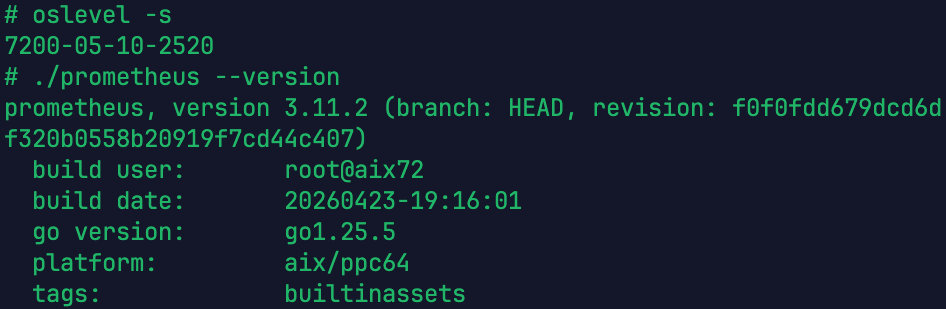
After all that, the binary builds, starts, scrapes itself, serves the UI, writes data to disk, persists through restarts, compacts blocks, memory-maps them back in on query, handles snapshots, and generally behaves like Prometheus does everywhere else. I ran promtool tsdb analyze against a populated data directory — the heaviest exercise of the mmap path you can inflict on it short of production traffic — and it finished clean.
Why You Might Care
If you run AIX, you probably already have some combination of nmon, Tivoli, enterprise monitoring shit, and a pile of scripts doing monitoring. They work. They've worked for decades. Why add Prometheus?
A few reasons that might actually apply to you:
It's the same tooling as the Linux half of your environment. If your shop has AIX LPARs next to Linux VMs next to whatever-else, Prometheus is probably already monitoring the Linux side. Bringing AIX into the same dashboard, the same alert rules, the same query language — that's worth something. One Grafana, not two monitoring philosophies.
The query language is genuinely good. PromQL lets you ask questions like "show me the 95th percentile CPU usage across all my LPARs in the last week, aggregated by workload group" as a single line.
Everything speaks Prometheus. If you want to alert on AIX metrics into PagerDuty, Slack, Teams, ServiceNow, or a pigeon — Alertmanager already has an integration, or someone's written a webhook for it. That ecosystem didn't grow around AIX, but it works for AIX once you're emitting Prometheus metrics.
node_exporter on AIX already exists. See my last week's newsletter. Pair it with Prometheus-on-AIX, and you have a self-contained monitoring loop that doesn't require a Linux jump box to collect metrics from.
Common Europe Congress 2026 is there!
The agenda is published! Do you want to know where AIX is going to? It means you MUST visit the Common Europe Congress in Lyon, France. There will be sessions about new AIX features and open source community development. We will talk about AIX and IBM Power automation and Zero Downtime for AIX. Join me in Lyon!

Your turn
The binary is here: https://dl.power-devops.com/prometheus/prometheus-3.11.2.aix-ppc64.tar.gz
Unofficial. Not blessed by the Prometheus project. Built from upstream 3.11.2 with the AIX patches described above. If it eats your data, I'll be sympathetic but not liable.
Minimum-viable deployment:
mkdir -p /data
cd /opt
gzip -dc /tmp/prometheus-3.11.2.aix-ppc64.tar.gz | tar xf -
cd prometheus-3.11.2.aix-ppc64

cat > prometheus.yml <<'EOF'
global:
  scrape_interval: 15s

scrape_configs:
  - job_name: 'prometheus'
    static_configs:
      - targets: ['localhost:9090']

  - job_name: 'node'
    static_configs:
      - targets: ['your-aix-host:9100']
EOF

./prometheus --config.file=prometheus.yml --storage.tsdb.path=/data/prometheus
Browse to http://your-prometheus-server:9090/, type up in the query box, and hit Execute. If you see 1, Prometheus is scraping itself, and you're in business.
To run it properly in the background, wire it into /etc/inittab. In the same way as I did it last week with node_exporter.
If you try the build, tell me how it breaks. It built and ran on my machine, which is not quite the same as saying it'll run on yours, and the only way this port becomes actually reliable is if enough people poke at it to shake out the weird cases.
Have fun with Prometheus on AIX!
Andrey

Hi, I am Andrey Klyachkin, IBM Champion and IBM AIX Community Advocate. This means I don’t work for IBM. Over the last twenty years, I have worked with many different IBM Power customers all over the world, both on-premise and in the cloud. I specialize in automating IBM Power infrastructures, making them even more robust and agile. I co-authored several IBM Redbooks and IBM Power certifications. I am an active Red Hat Certified Engineer and Instructor.
Follow me on LinkedIn, Twitter and YouTube.
You can meet me at events like IBM TechXchange, the Common Europe Congress, and GSE Germany’s IBM Power Working Group sessions.